
This is Lesson 1 of 8 from AI For Youth: Grade 6, shown exactly as subscribers see it. No account is needed to read it. Subscribers get every lesson, the graded quizzes, the project, progress tracking, and a certificate of completion.
Get accessYour child already lives in a world full of AI, and that will be true for the rest of their life. The good news is that understanding it is well within reach. This course explains how AI really works at your child’s grade level, one clear lesson at a time, so they can use it with confidence and know when to double-check it. The first lesson is below. Read it together and see if it fits.
This lesson introduces what an AI assistant is doing when it answers a question. It covers how the assistant is related to the word suggestions on a phone, the three steps between pressing send and reading the answer, where the words come from, and what kinds of tasks the tool is good at.
By the end of this lesson you can
- Say what an assistant is doing when it answers you.
- Explain how it is related to the word suggestions on your phone.
- Say what does not happen when you press send.
- Explain why you cannot tell a checked answer from an unchecked one.
Word suggestions, scaled up
An AI assistant is a computer program that takes some words from you and adds more words that fit well after them. The words it adds are the answer you read.
The same idea already exists in a smaller form on most phones. A word suggestion is the phone offering the next word while you type. Type “see you tomo” into a message and the phone offers “tomorrow”. It can do this because it has processed a great many messages, and after “tomo” the next thing is almost always “tomorrow”.
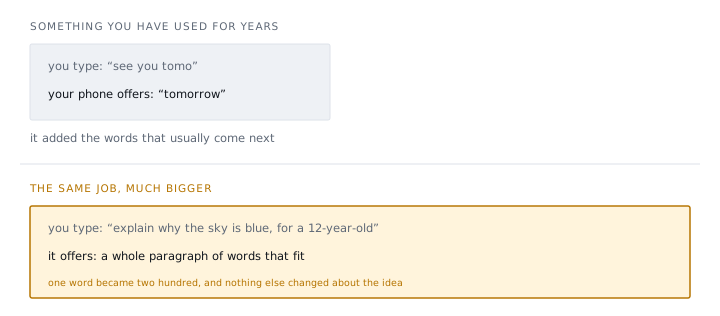
An assistant does the same job with one change: instead of offering the next word, it offers the next two hundred. You give it some words, and it adds words that fit well after them. That description covers most of what the tool does. It is not a small person inside the computer. It is a very good machine for producing words that fit.
This description leads to the most important point in the course. “Words that fit” and “words that are true” are not the same thing. Nothing in the description of the machine mentions truth at all. The useful things an assistant can do, and the ways it goes wrong, both follow from this.
Try it
- You type “Happy birth” into a message. Your phone offers “birthday”. Explain, in one sentence, how the phone chose that word.
- You type “Write a short poem about rain” into an assistant and get four lines back. In what way is this the same job as question 1? In what way is it bigger?
Answers
1. The phone has processed many messages, and after “birth” the word that usually comes next is “birthday”, so it offers the word that fits.
2. It is the same job because the assistant is adding words that fit well after the words you typed. It is bigger because it adds a whole poem, not one word.
The three steps after pressing send
The journey of one question has three steps.
- You type some words.
- The assistant adds words that fit well after them.
- You read the answer.
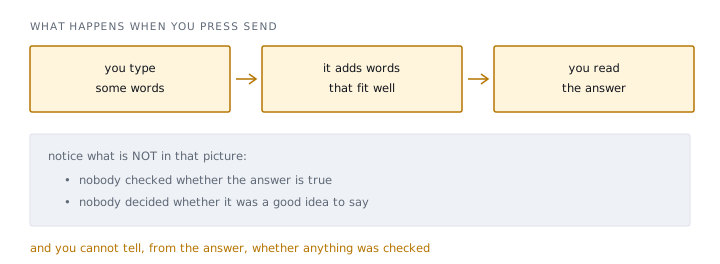
The list of what is missing matters more than the three steps do. Nothing in that journey checks whether the answer is true. There is no step where the machine looks something up, finds that its answer does not match, and corrects itself. It produces words that fit, and then it stops. Nobody decides whether the answer was a good idea to say, either.
Some assistants can be built to search for things, and some of those will tell you where they looked. That helps. But searching is an extra part that somebody added on the side, not part of the basic machine, and you cannot tell which kind you are using from how confident the answer sounds. A searched answer and an unsearched answer can look exactly the same.
An answer looking good is not evidence that it is good.
This is the single most useful habit in the course. It appears here in Lesson 1 rather than in Lesson 8 because it matters that much, and every later lesson uses it.
Try it
- An assistant gives you a long, calm, well-organized answer about the moon. Which of the three steps checked that the facts in it are true?
- A friend says, “Mine must have searched the web, because the answer was so detailed.” Is that a safe conclusion?
Answers
1. None of them. The three steps are type, add words, read. Checking is not one of them.
2. No. Detail and confidence come from the way people write, which the machine copies. They do not show whether anything was searched or checked.
Where the words come from
The assistant produces words that fit. To understand what they fit with, you need to know what the machine was built from.
The training text of an assistant is the enormous amount of writing by people that it was built from: websites, books, articles, conversations, instructions, arguments, recipes, and far more than any person could read in a lifetime. From all of that writing, the machine became extremely good at one thing: given some words, what usually comes next.
Two consequences follow from this, and both come up again in later lessons.
1. It sounds like people because people wrote everything it was made from. The friendly tone, the confident explanations, and the helpful little summaries at the end are patterns in how humans write, reproduced by the machine. The assistant was not designed to seem friendly on purpose, and it does not learn your way of writing as you talk. It copies the way people in general write.
2. It is only as good as what was written down. If a subject is well covered and usually written about correctly, you will get a good answer. If a subject is rare, or recent, or mostly written about wrongly, you will get an answer in exactly the same confident voice, and it will be worse.
Try it
- Which question is more likely to get a good answer: “Why does ice float?” or “What happened at my school’s sports day last week?” Explain why using the idea of training text.
Answer
“Why does ice float?” Many people have written about it, and most of them wrote about it correctly. Almost nobody has written about one school’s sports day, so there is little or nothing in the training text to fit, and the answer will be worse while sounding just as confident.
What the tool is for
None of this means assistants are useless. It means they are a particular kind of tool, and knowing the shape of the tool tells you what to use it for.
giving you ten ideas when you are stuck for one
cleaning up something you already wrote
risky at facts you are going to rely on
anything where being wrong actually costs something
There is a pattern in the list. The tool is at its best when you already have the material and want it rearranged: explained again, expanded into ideas, or cleaned up. In each of those cases you can judge the result yourself. It is at its worst when you are asking for something you do not have and cannot check, such as a date for your history homework, a fact to settle an argument, or a decision about which subjects to take next year.
Lesson 5 comes back to this and gives the checking habit that fixes most of the risk. Before that, Lessons 2 to 4 cover the features of the tool that catch nearly everybody out. Lesson 2 is about the fact that the assistant says “I”, and what is actually there when it does.
Try it
- Sort these four requests into “good use” and “risky use”: (a) “Explain fractions to me a different way.” (b) “What year did my town’s library open?” (c) “Give me ten title ideas for my story.” (d) “Which medicine should I take for this?”
Answer
Good use: (a) and (c). You already have the material or can judge the ideas yourself. Risky use: (b) and (d). Each is a fact you would rely on and cannot check from the answer alone, and (d) is one where being wrong costs something.
Summary
- An AI assistant takes the words you give it and adds words that fit well after them. It is the word suggestion on your phone, scaled up from one word to two hundred.
- There are three steps between pressing send and reading the answer: you type, it adds words, you read. No step checks whether the answer is true.
- Some assistants can search, but you cannot tell from the answer whether yours did. A confident answer looks the same either way.
- It sounds like a person because it was built from writing by people, and it is only as good as what people wrote down.
- It is best at rearranging material you already have, and worst at supplying facts you cannot check.
Key terms
- AI assistant — a program that adds words that fit well after the words you give it.
- Word suggestion — a phone offering the next word while you type; the same job at a smaller size.
- Training text — the enormous amount of writing by people that an assistant was built from.
- Words that fit — words that usually come next in human writing; not the same as words that are true.
Check your understanding
5 questions · 70% to pass · retakes encouraged
In the full course the graded quiz comes next and your progress is saved. Get access to continue.
Want the next free lesson by email? We post new free lessons and short tips for guiding your child with AI.
A short note when new free lessons are posted, plus occasional tips. No spam. Unsubscribe any time.That is the whole first lesson. The full AI For Youth: Grade 6 course has 8 lessons, 8 quizzes, and a project. One subscription unlocks every course, kindergarten through grade 12, plus AI Fundamentals for general audiences.
Get access